SVGPlot
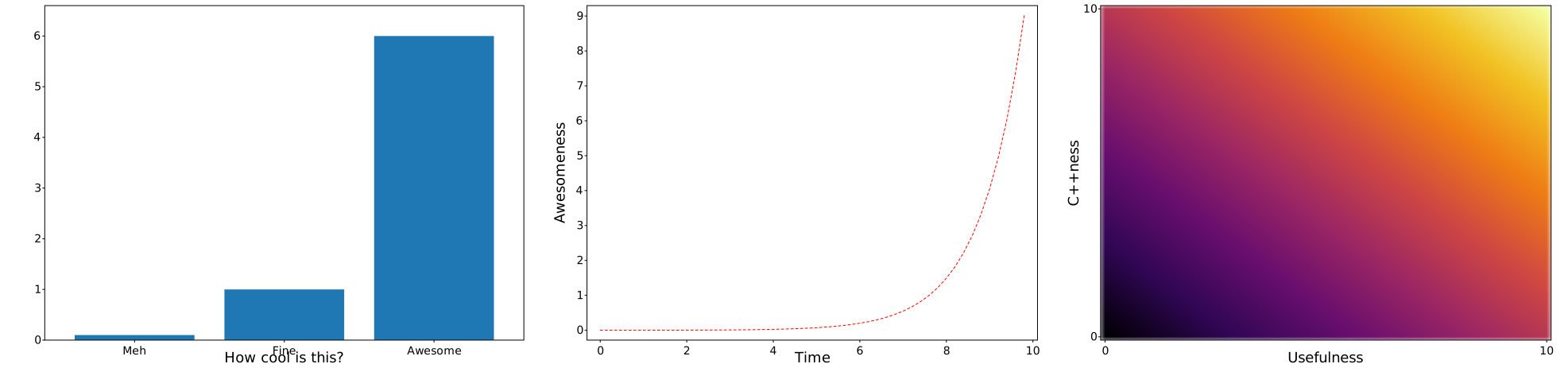
Example teaser
svg::plot::SVGPlot plt;
plt.subplot(1,3,0).xlabel("How cool is this?").bar({"Meh","Fine","Awesome"},{0.1,1,6});
plt.subplot(1,3,1).ylabel("Awesomeness").xlabel("Time").plot(svg::plot::arange(0.0,10.0,0.2),[] (float x) { return std::exp(x)/2000.0f; },"r--");
plt.subplot(1,3,2).ylabel("C++ness").xlabel("Usefulness").imshow(svg::plot::arange(0.0,10.0,0.2),svg::plot::arange(0.0,10.0,0.2),[] (float x, float y) { return x+y; }).interpolation("bicubic").cmap("inferno");
plt.savefig("../doc/svgplot/teaser.svg");
Description
Plotting with svg.cc is designed to be similar to (or more accurately, a subset of) matplotlib.pyplot or MATLAB in terms of plotting. Each method makes some change to a figure: e.g., creates a figure, creates a plotting area in a figure, plots some lines in a plotting area, decorates the plot with labels, etc. There is, however, a small difference: all the functions are translated into methods of the class svg::plot::SVGPlot. Each of these methods provides a functionality similar to their matplotlib.pyplot counterparts. The result of the diagrams can be saved into an svg file, which is easily converted to other formats.
The provided functionality is rather small, compared to the well stablished matplotlib.pyplot. While I am expanding it to fulfill my own needs, some very niche features will never ever be provided. However, the provided functionality seems to be enough (at least for my needs) given the fact that the resulting diagrams can easily be edited and tweaked afterwards, for instance with the vector drawing software Inkscape.
Also, this is for now a single author project so I am updating the documentation with features which I deem stable but there are some other features that I don’t consider ready and usable so they won’t be documented (so you don’t use them). Also, my documentation style is not very formal and tends to illustrate the functionality through examples (which is what very often works for me when I read documentation).
Usage
Assuming that you have followed the installation instructions, you have two options for using svg::plot::SVGPlot with all it’s functionality.
- You can include
svg/plot/svgplot.hand then link the static librarysvgplot. I don’t provide binaries for the library but it is easily compiled. I do it with CMake using the line thereadd_library(svgplot ...). You can also include myCMakeLists.txtinto your project, although it probably compiles things that you don’t need. - You can include header-only version
svg/plot/svgplot-headeronly.hand link nothing. This is even easier but compile times will tend to be significantly larger.
Named parameters
In matplotlib.pyplot (as generally in Python) it is actually possible to use any parameter as a named parameter, which very often enables functions and methods to have many parameters with default values and only set the values of a few of them as needed. This is specially useful for diagrams in which most of the times you want to have smart default values that affect appearance and only define the ones that matter for the information you aim to convey.
However, C++ does not have any kind of support for named parameters, so in svg::plot::SVGPlot these are defined as postfix methods that return references to the same class, so they can be concatenated.
For example, the Python call
plt.imshow(data, interpolation = 'bicubic', extent = [0,1,0,1], vmin=0, vmax=1, cmap='inferno')
is emulated as
plt.imshow(data).interpolation("bicubic").extent({0,1,0,1}).vmin(0).vmax(1).cmap("inferno");
which although technically are not named parameters they look similar hence we will call them named parameters throughout the documentation.
Diagrams
The provided methods that generate different types of diagrams are:
plot: plots x,y graphs with different styles and configuration options.scatter: generates x,y scatter plots with potential visualizations of more variables through marker colors or sizes.imshow: plots two-dimensional data.barandbarh: generates bar graphs.hist: generates histograms from 1D samples.
Also, the appearance of the diagrams can be modified and/or combined through:
subplot: Enables generating figures with multiple plots with relative positioning between them.
Saving
Finally, the method savefig("file.svg") enables the saving of the corresponding plot into the file.svg file. The format of this svg is designed so that it holds reasonably well when converting it to pdf, for instance with the vector drawing software Inkscape.
In fact, with Inkscape it is possible to convert svg to pdf using the command line.
inkscape file.svg --export-type=pdf --export-filename=file.pdf
By default, the savefig() method expects file with svg extension. Other extensions are supported: png, pdf amd eps, but they require Inkscape to be installed and its executable accesible from the command line path, while the svg output does not require additional software.
C++ plotting alternatives
There are several alternatives to svg::plot::SVGPlot for plotting from C++.
- sciplot - Requires gnuplot
- Matplot++ - Requires gnuplot
- matplotlib-cpp - Resembles
matplotlib, and requires an installed version ofmatplotlibwith python interoperability.
In contrast svg::plot::SVGPlot resembles matplotlib and has no dependency, except for, optionally, libpng for interpolated imshow and Inkscape for saving in formats different to .svg.