SVGPlot::hist
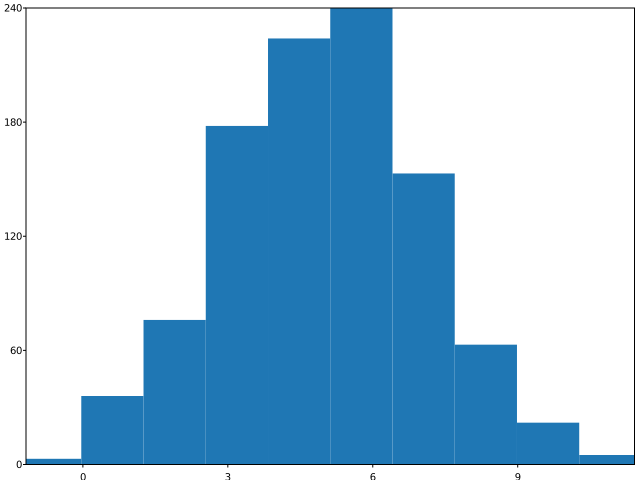
The hist method provides a way to generate histograms from data, from svg::plot::SVGPlot class. It expectes a single parameter, which are the samples from which the histogram is going to be calculated and plotted:
      std::mt19937 gen{1}; //Fixed seed
      std::normal_distribution<float> d{5,2};
      std::list<float> samples;
      for (int n=0;n<1000;++n) { samples.push_back(d(gen)); }
      svg::plot::SVGPlot plt;
      plt.hist(samples);
      plt.savefig("../docs/svgplot/hist/example1.svg");
This generates the histogram in its classic appearance:
Binning
By default the histogram is distributed uniformly among 10 bins. However, these can be tweaked through several named attributes (modeled as methods in C++).
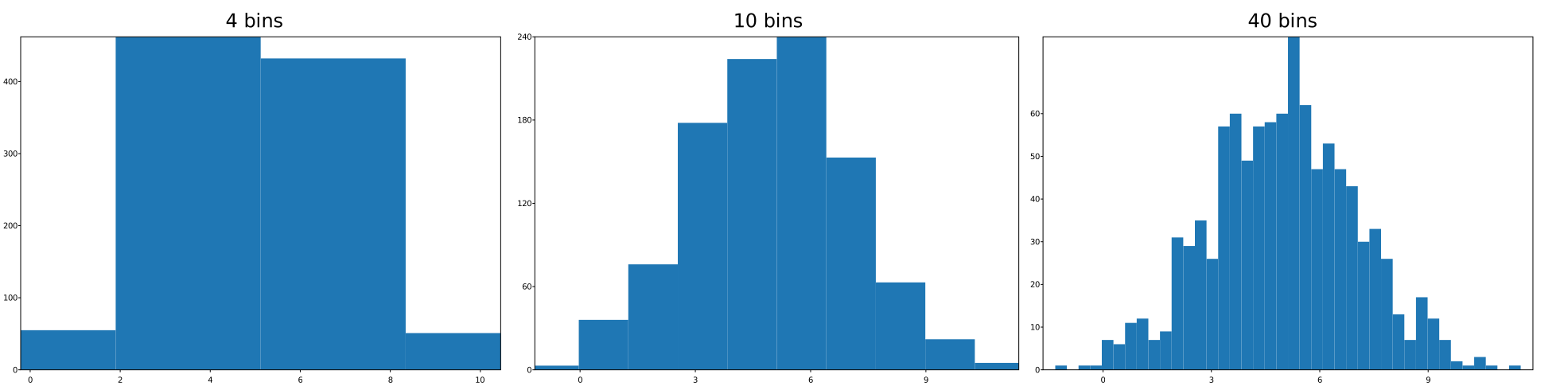
The bins named attribute can be set as a number (integer) that indicates the number of bins of the histogram:
      std::mt19937 gen{1}; //Fixed seed
      std::normal_distribution<float> d{5,2};
      std::list<float> samples;
      for (int n=0;n<1000;++n) { samples.push_back(d(gen)); }
      svg::plot::SVGPlot plt;
      std::vector<std::size_t> nbins{4,10,40};
      for (std::size_t b = 0; b<nbins.size();++b)
          plt.subplot(1,nbins.size(),b).title(std::to_string(nbins[b])+" bins").hist(samples).bins(nbins[b]);
      plt.savefig("../docs/svgplot/hist/example2.svg");
Note how the number of bins increases, yielding increased resolution on the histogram (at the cost of potential noise):
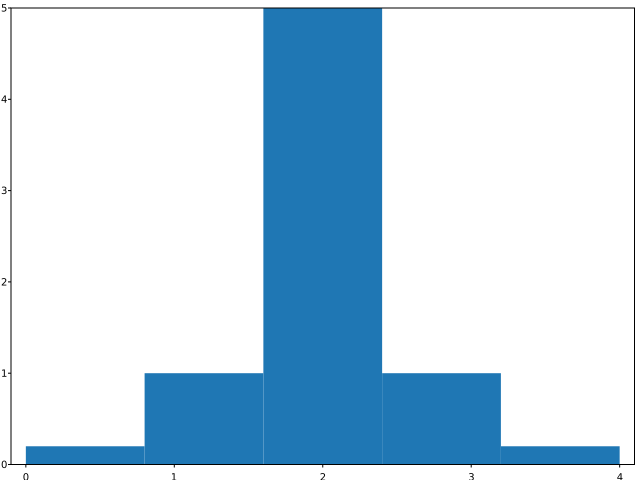
The weights named attribute is a sequence of the same size of the samples that defines the weight of each sample (it is otherwise 1). This can be used to have a weighted average, or to draw a histogram of data that has already been binned (by treating each bin as a single point with a weight equal to its count, although you could use bar for this).
      svg::plot::SVGPlot plt;
      plt.hist({0,1,2,3,4}).weights({0.2,1,5,1,0.2}).bins(5);
      plt.savefig("../docs/svgplot/hist/example3.svg");
generates
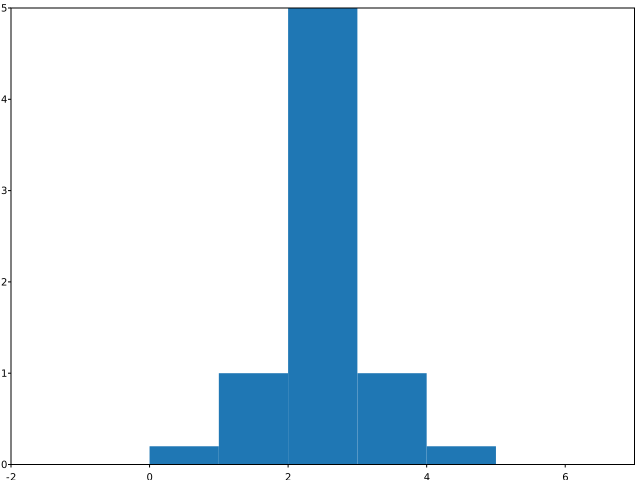
By default, the range covered by the histogram is limited by the minimum and maximum values of the samples, but is also possible to control this range with the range named attribute:
      svg::plot::SVGPlot plt;
      plt.hist({0,1,2,3,4}).weights({0.2,1,5,1,0.2}).range({-2,7}).bins(9);
      plt.savefig("../docs/svgplot/hist/example4.svg");
that yields
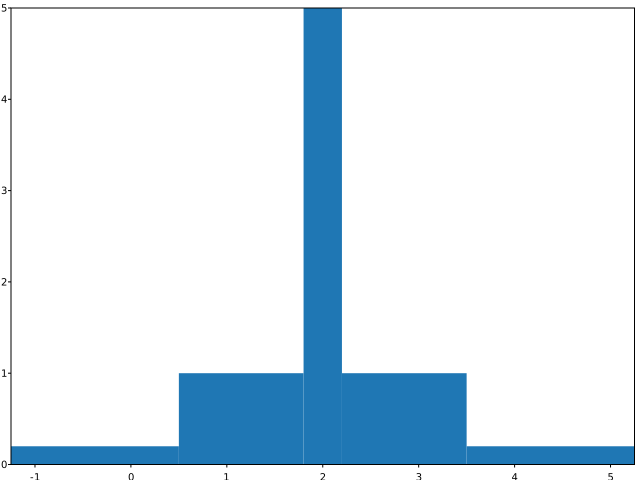
A finer control is granted when the bin named attribute is setup as a sequence of values (as opposed to an integer value). The sequence gives bin edges, including left edge of first bin and right edge of last bin. All but the last (righthand-most) bin is half-open. In other words, if bins is {1, 2, 3, 4} then the first bin is [1, 2) (including 1, but excluding 2) and the second [2, 3). The last bin, however, is [3, 4], which includes 4. Unequally spaced bins are supported if bins is a sequence, and the range parameter is ignored. An example of this is given by the following code:
      svg::plot::SVGPlot plt;
      plt.hist({0,1,2,3,4}).weights({0.2,1,5,1,0.2}).bins({-2,0.5,1.8,2.2,3.5,6});
      plt.savefig("../docs/svgplot/hist/example5.svg");
that outputs the following graph:
Distribution modifications
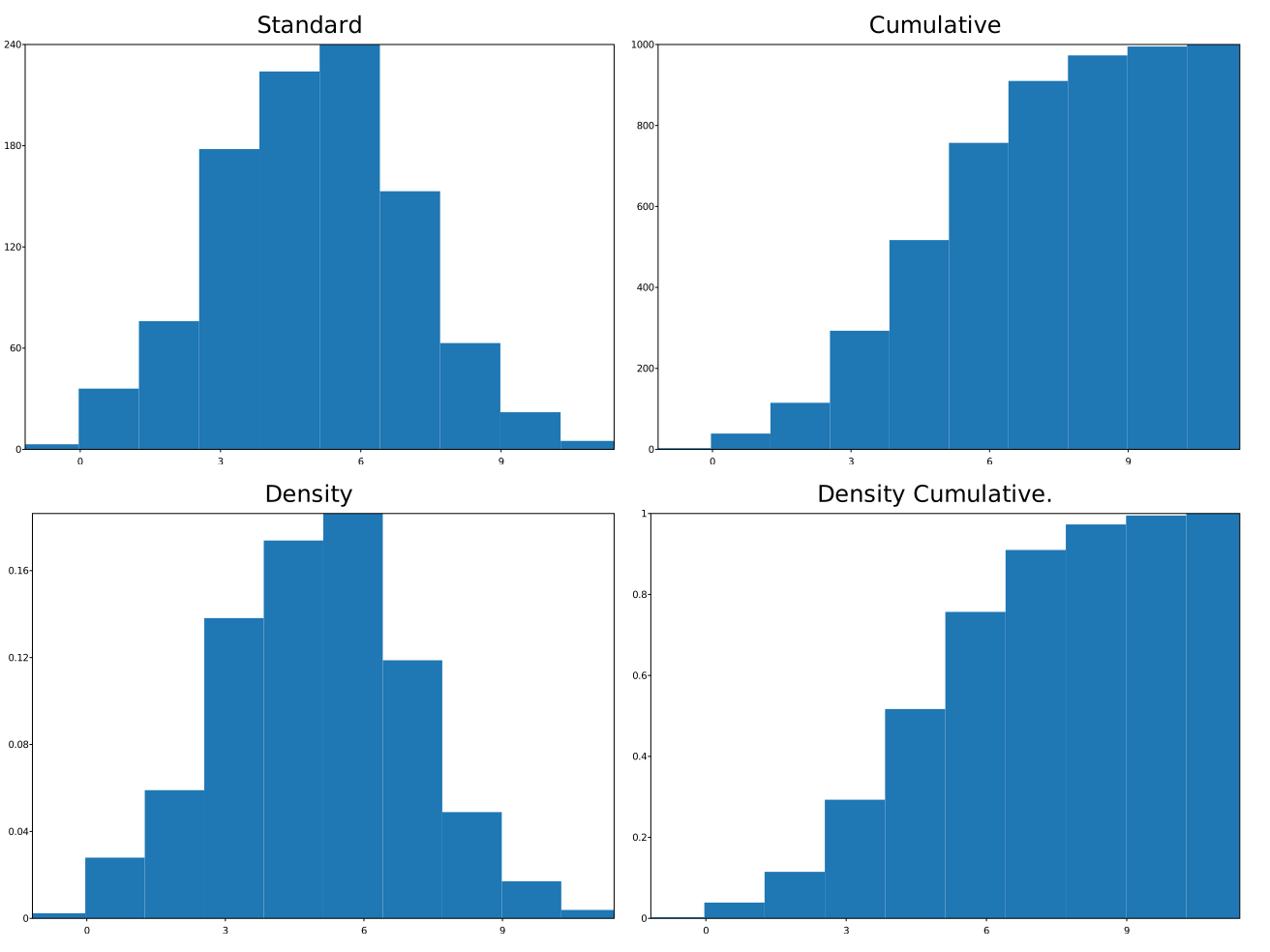
The density named parameter is a boolean (that can be setup either with a .density(true) call or a .density() call). If true, the histogram is normalized to form a probability density, i.e., the area (or integral) under the histogram will sum to 1. This is achieved by dividing the count by the number of observations times the bin width.
The cumulative named parameter is a boolean (that can be setup either with a .cumulative(true) call or a .cumulative() call). If true, then a histogram is computed where each bin gives the counts in that bin plus all bins for smaller values. The last bin gives the total number of datapoints. If density is also true then the histogram is normalized such that the last bin equals 1.
The usage of both booleans is illustrated in the following example (for the same sample points):
      std::mt19937 gen{1}; //Fixed seed
      std::normal_distribution<float> d{5,2};
      std::list<float> samples;
      for (int n=0;n<1000;++n) { samples.push_back(d(gen)); }
      svg::plot::SVGPlot plt;
      plt.subplot(2,2,0).title("Standard").hist(samples);
      plt.subplot(2,2,1).title("Cumulative").hist(samples).cumulative();
      plt.subplot(2,2,2).title("Density").hist(samples).density();
      plt.subplot(2,2,3).title("Density Cumulative.").hist(samples).density().cumulative();
      plt.savefig("../docs/svgplot/hist/example6.svg");
This example yields the following result that shows how the histograms are affected by both parameters:
Formatting
There are also several options also for formatting the histogram and tweaking its appearance.
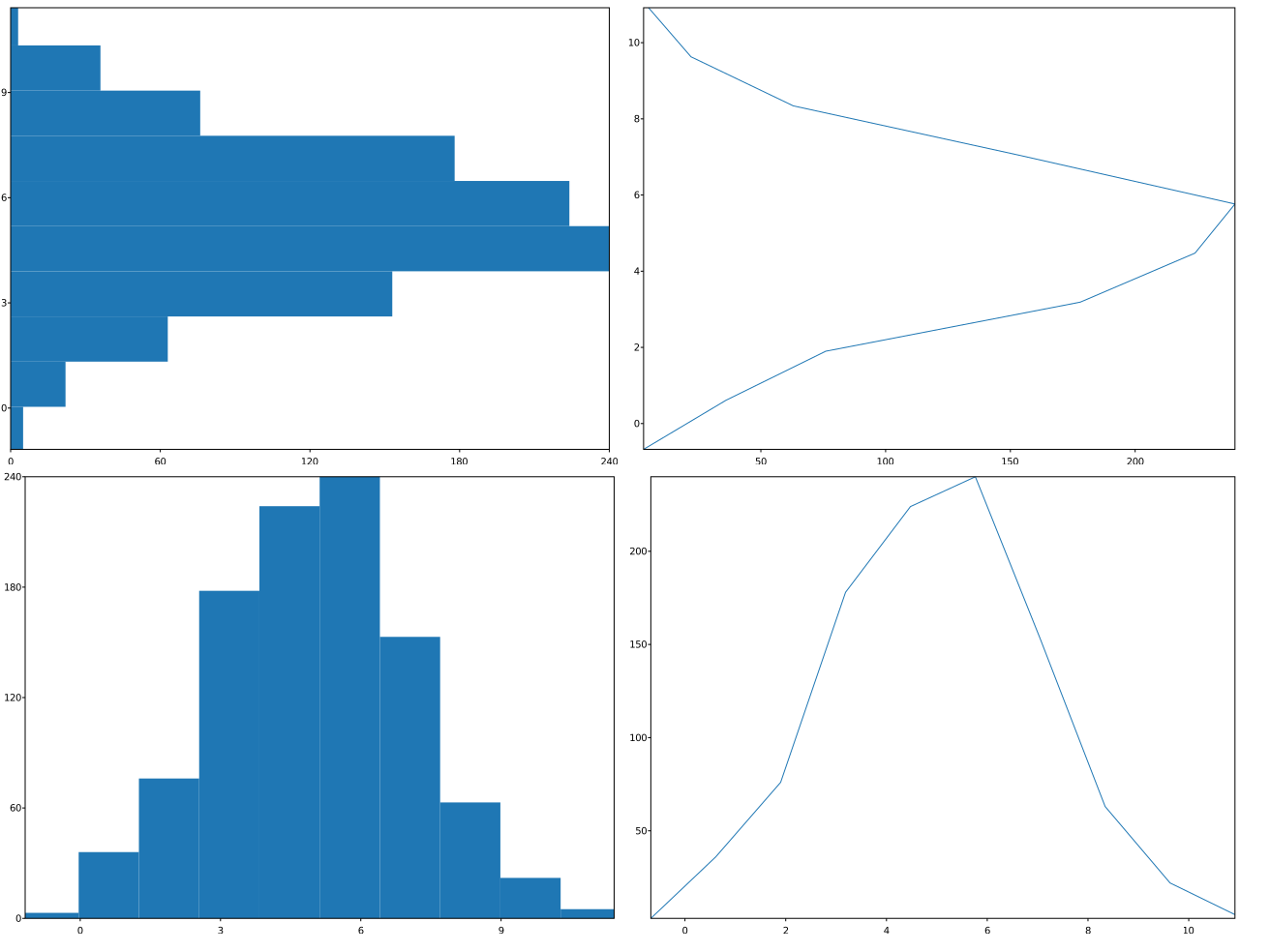
For instance, the histtype named parameter (represented by a method) defines the type of graph that represents the histogram:
"bar"is a traditional bar-type histogram (default). Can be setup also as a typed global variable (not a string, without quotes)"step"generates a lineplot. Can be setup also as a typed global variable (not a string, without quotes).
Also, it is possible to choose the orientation of the histogram with the orientation named attribute, which can be either "vertical" or "horizontal", that, as well, can be setup as global typed variables (not strings). Both options are illustrated in the follwoing example:
      std::mt19937 gen{1}; //Fixed seed
      std::normal_distribution<float> d{5,2};
      std::list<float> samples;
      for (int n=0;n<1000;++n) { samples.push_back(d(gen)); }
      svg::plot::SVGPlot plt;
      std::vector<std::string> orientations{"vertical","horizontal"};
      std::vector<std::string> histtypes{"bar","step"};
      for (std::size_t o = 0; o<orientations.size(); ++o) for (std::size_t t = 0; t<histtypes.size(); ++t)
          plt.subplot(orientations.size(),histtypes.size(),t+histtypes.size()*o).hist(samples)
              .orientation(orientations[o]).histtype(histtypes[t]);
      plt.savefig("../docs/svgplot/hist/example7.svg");
that yields
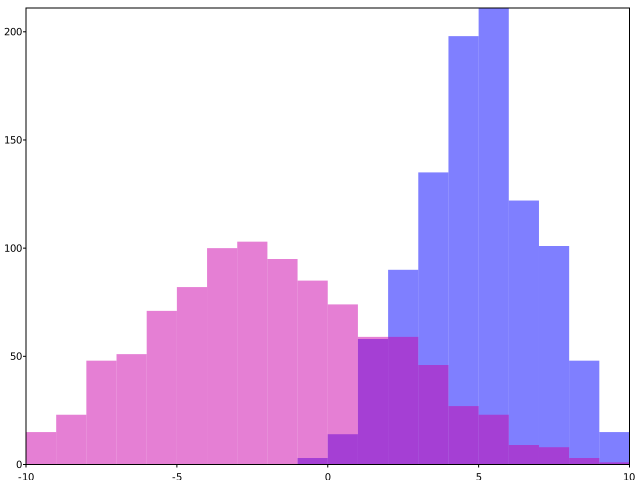
Last, it is also possible to tweak the color of the histogram with the color named attribute (represented as a method). Colors can be represented as described here. Also, the alpha parameter defines transparency, which is specially useful for plotting multiple histograms in the same graph:
      std::mt19937 gen{1}; //Fixed seed
      std::normal_distribution<> d1{5,2}, d2{-2,4};
      std::list<float> samples1, samples2;
      for (int n=0;n<1000;++n) { samples1.push_back(d1(gen)); samples2.push_back(d2(gen)); }
      svg::plot::SVGPlot plt;
      plt.hist(samples1).range({-10,10}).bins(20).color("blue").alpha(0.5);
      plt.hist(samples2).range({-10,10}).bins(20).color("#CC00AA").alpha(0.5);
      plt.savefig("../docs/svgplot/hist/example8.svg");
This code generates the following graph: