SVGPlot::scatter
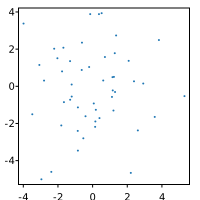
The scatter method of the svg::plot::SVGPlot class generates scatter plots: a type of plot or mathematical diagram using Cartesian coordinates to display values for typically two variables for a set of data (passed as the two parameters x and y of the method). The points can be coded coded (color/shape/size) for displaying additional variables. Generating scatter plots is very quick:
  std::mt19937 gen{1}; //Fixed seed
  std::normal_distribution<float> d{0,2};
  std::vector<float> x,y;
  for (int n=0;n<50;++n) { x.push_back(d(gen)); y.push_back(d(gen)); }
  svg::plot::SVGPlot plt;
  plt.scatter(x,y);
  plt.figsize({200,200}).savefig("../docs/svgplot/scatter/example1.svg");
which generates a scatter plot with points distributed randomly according to a normal distribution:
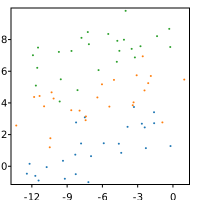
As expected, the x and y parameters can be any C++ collection or bracketed list. Also, if needed (although not very useful for scatter plots), list generators such as arange(<start>,<stop>,<step>) and linspace(<start>,<stop>,<nsamples = 50>) are provided. Many scatter plots can be included in the same graph through multiple calls of the scatter method:
  std::mt19937 gen{1}; //Fixed seed
  std::normal_distribution<float> d{0,1};
  svg::plot::SVGPlot plt;
  for (int r = 0; r<3; ++r) {
      std::vector<float> x,y;
      for (int s=0;s<25;++s) {
          x.push_back(-12.5+0.5*s+d(gen)); y.push_back(3*r+0.1*s+d(gen));
      }
      plt.scatter(x,y);
  }
  plt.figsize({200,200}).savefig("../docs/svgplot/scatter/example2.svg");
which automatically assigns a specific color (with a palette similar to matplotlib’s) to each of the scatter plots in order to differenciate them:
Formatting
The appearance of a scatter plot can be setup in multiple ways through named parameters (which are represented as methods):
s(<float>): The marker size in pointsc(<color>): defines the color of the marker.edgecolors(<color>): defines the color of the edge of the marker. It cannot be seen if thelinewidthsis 0.linewidths(<float>): The width of the edge line of the marker (default is 0).alpha(<float>): Transparency of the markers from 0 (totally transparent, invisible) to 1 (totally opaque, default value).
These are illustrated here:
  std::mt19937 gen{1}; //Fixed seed
  std::fisher_f_distribution<float> d(5.0,5.0);
  std::vector<float> x,y;
  for (int n=0;n<50;++n) {
      x.push_back(d(gen)); y.push_back(d(gen));
  }
  svg::plot::SVGPlot plt;
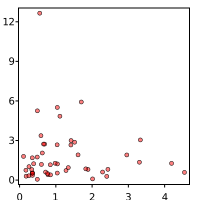
  plt.scatter(x,y).c("r").alpha(0.5).s(2).edgecolors("black").linewidths(0.5);
  plt.figsize({200,200}).savefig("../docs/svgplot/scatter/example3.svg");
which generates
The shape of the marker can be defined by the marker(<string>) named parameter. There are multiple enabled options for marker shapes, as illustrated in the following code:
svg::plot::SVGPlot plt; int p=0;
for (std::string marker : {"o",".",",","v",">","^","<","s","+","P","x","X"}) {
auto& sub = plt.subplot(2,6,p++);
sub.title("'"+((marker!="<")?marker:"<")+"'"); //.fontsize(2);
sub.axis({-1,1,-1,1}).xticks({}).yticks({}).figsize({245,265}).linewidth(1);
sub.scatter({0},{0}).marker(marker).s(100.0f);
}
plt.savefig("../docs/svgplot/scatter/example4.svg");generates a visualization of all the available marker shapes:
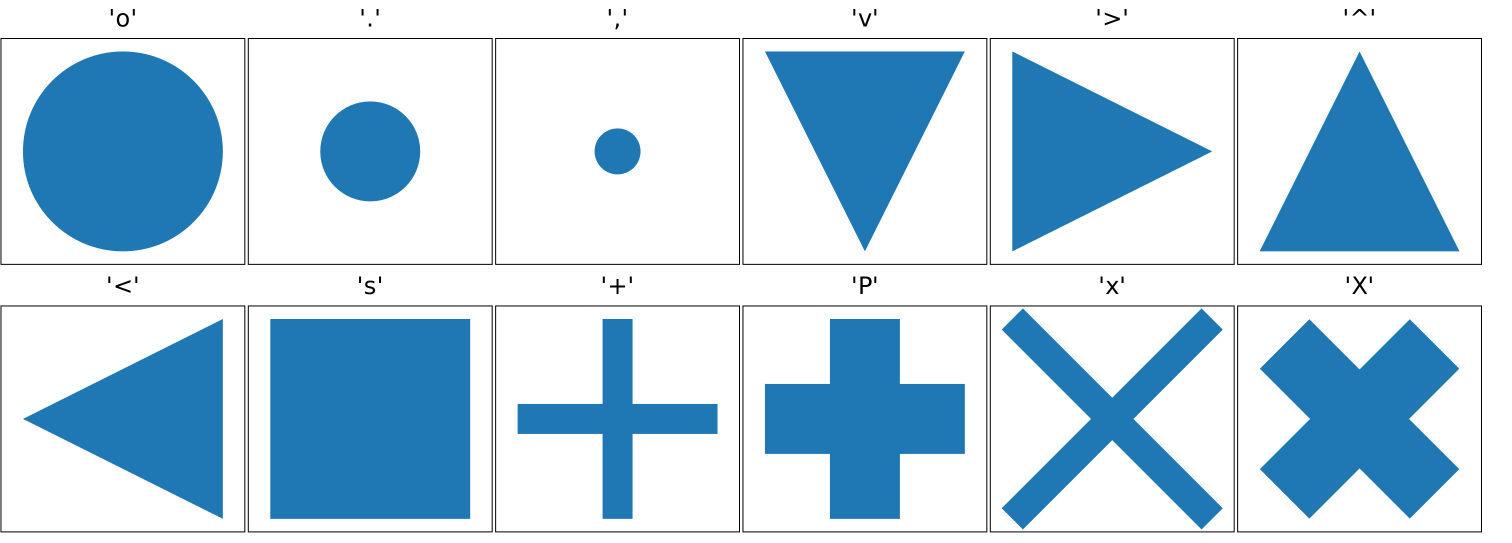
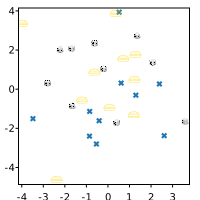
Additionally, markers can be generated from an image file (.png, .jpg and .svg), by puting the file name of the image instead of a character that defines the marker. In the case of .svg file format it preserves the color given by the c named parameter(or a default color). Images are embedded in the output file directly, so there is no need to carry them along with the output graph. This is illustrated in the following source code:
  std::mt19937 gen{1}; //Fixed seed
  std::normal_distribution<float> d{0,2};
  std::list<float> x,y;
  svg::plot::SVGPlot plt;

  for (int n=0;n<10;++n) { x.push_back(d(gen)); y.push_back(d(gen)); }
  plt.scatter(x,y).s(3).marker("X");
  x.clear(); y.clear();
  for (int n=0;n<10;++n) { x.push_back(d(gen)); y.push_back(d(gen)); }
  plt.scatter(x,y).s(6).c(svg::hsv(50,1,1)).marker("../svg/burger.svg");
  x.clear(); y.clear();
  for (int n=0;n<10;++n) { x.push_back(d(gen)); y.push_back(d(gen)); }
  plt.scatter(x,y).s(4).marker("../svg/dice.png");

  plt.figsize({200,200});
  plt.savefig("../docs/svgplot/scatter/example5.svg");
that gives the following output:
Sequence parameters and aditional variables
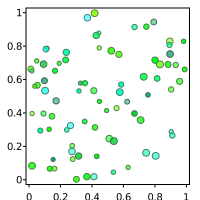
All the named parameters related to format discussed above (c, s, alpha, edgecolors and linewidths) can also have a sequence (any iterable collection) for the same data type as parameter. Each element of the sequence is assigned to each x, y data point. This sequence parameters can be used to show more data than two dimensions for the same plot. This is illustrated in the following source code:
  std::mt19937 gen{1}; //Fixed seed
  std::uniform_real_distribution<float> d(0,1);
  std::list<float> x,y,opacity,size;
  std::list<svg::Color> colors,edges;
  for (int i=0;i<80;++i) {
      x.push_back(d(gen)); y.push_back(d(gen));
      opacity.push_back(std::max(std::min(0.5f*d(gen)+0.5f,1.0f),0.0f));
      size.push_back(2.0f + 1.5f*d(gen));
      float hue = 90 + 120*d(gen);
      colors.push_back(svg::hsv(hue,1.0,1.0));
      edges.push_back(svg::hsv(hue,0.5,0.5));
  }
that gives the following output:
Color maps
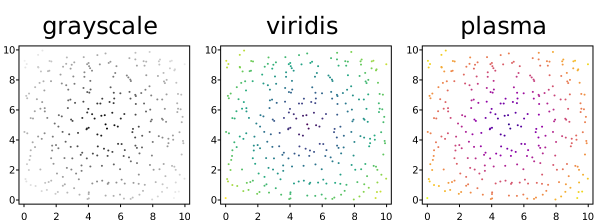
Additional variables can be visualized by modifying each marker’s color through the c(<sequence>) named parameter, when passing a sequence (C++ collection) of floating point values, instead of a sequence of colors. The mapping to RGB values is done (like in Matplotlib) through a color map, where the maximum and minimum labeled values are calculated automatically from the data so there is no clamping. It is possible, however, to specifically set those clamping values through the vmin(<float>) and vmax(<float>) named parameters (represented in C++ as methods). Furthermore, the color map can be specified through the cmap(<string>) or cmap(<ColorMap>) named parameter. You can find more information about color maps here.
The following example illustrates three different color maps for the same set of values:
  std::mt19937 gen{1}; //Fixed seed
  std::uniform_real_distribution<float> d(0,1);
  std::list<float> x,y, value;
  for (int i=0;i<10;++i) for (int j=0;j<10;++j) for (int s=0;s<3;++s) {
      x.push_back(i+d(gen)); y.push_back(j+d(gen));
      value.push_back(sqrt((x.back()-5.0f)*(x.back()-5.0f)+(y.back()-5.0f)*(y.back()-5.0f)));
  }
  svg::plot::SVGPlot plt; int p = 0;
  for (auto cmap : {"grayscale","viridis","plasma"})
      plt.subplot(1,3,p++).title(cmap).figsize({200,220}).scatter(x,y).c(value).cmap(cmap);

  plt.savefig("../docs/svgplot/scatter/example7.svg");
  }
}
The resulting application of color maps can be seen here: