SVGPlot::subplot
The method subplot(nrows,ncols,index) adds a subplot to the current figure and returns a reference to it (svg::plot::SVGPlot&). The SVGPlot from which this methods is called will be composed of subplots and have no plots of its own. The subplot will take the index position on a grid with nrows rows and ncols columns. index starts at 0 in the upper left corner and increases to the right (note that matplotlib’s subplot method starts at index 1, but in this library we choose 0 as starting index because it is more C++y).
As the subplot method returns a reference to a new svg::plot::SVGPlot, it is rather simple to compose figures with subplots (it is possible to directly call . The following code
		svg::plot::SVGPlot plt;
      for (int spx = 0; spx < 3; ++spx) for (int spy = 0; spy < 3; ++spy)
          plt.subplot(3,3,spy*3+spx).plot(
              svg::plot::linspace(0.0,2.0*M_PI,100),
              [&] (float x) { return std::sin(float(spx+1)*x)*std::sin(4*float(spy+1)*x); });
 		plt.savefig("../doc/svgplot/subplot/example1.svg");
generates the following graph
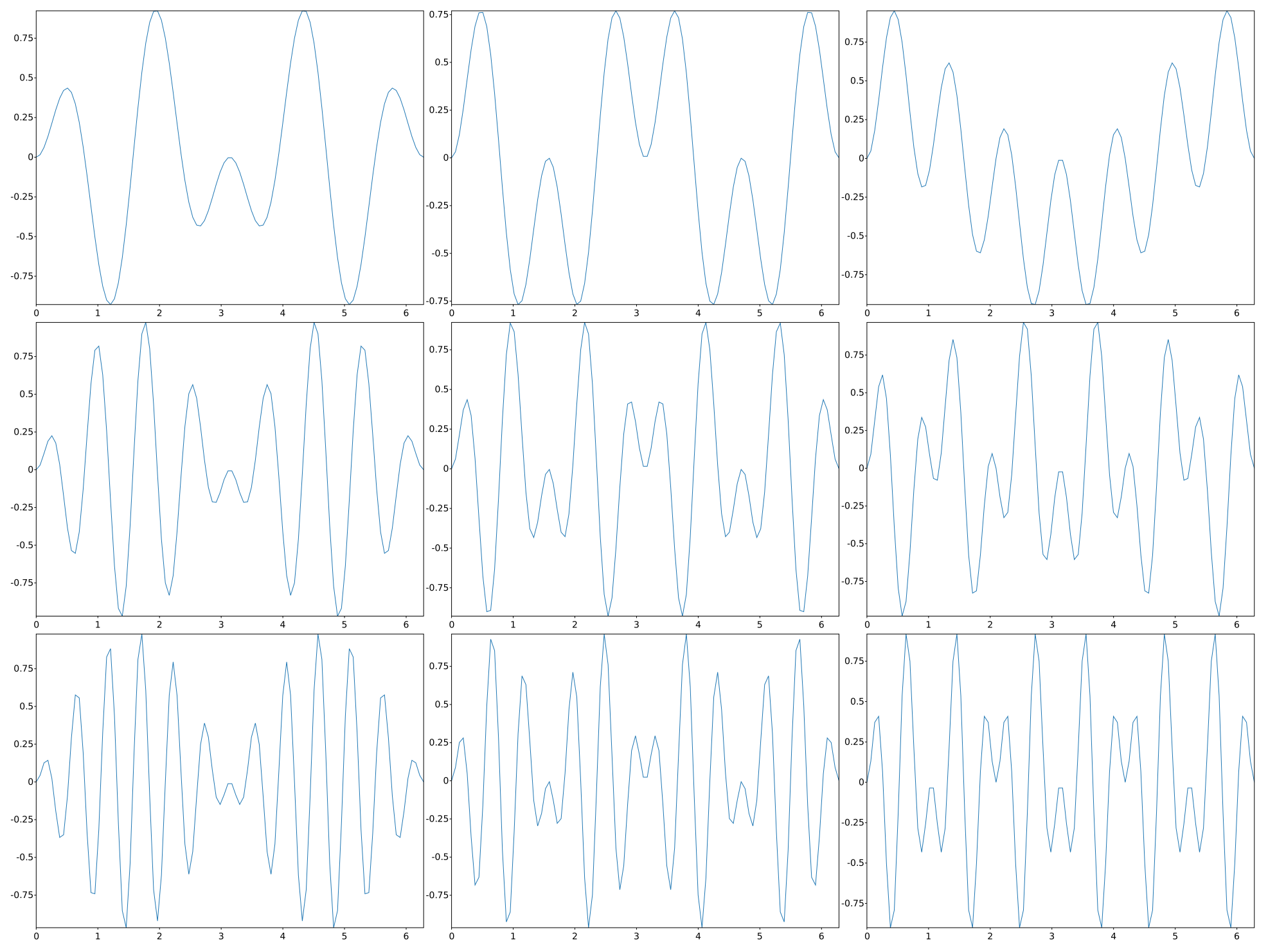
The subplots can modify all their properties for visualization (title, size, ticks…) the same way than plots do, as the following code illustrates:
		svg::plot::SVGPlot plt;
      auto x = svg::plot::linspace(0.0,1.0,100);
      for (int p = 0; p<4;++p) plt.subplot(2,2,p).figsize({200,200}).xticks({}).yticks({});
      plt.subplot(2,2,0).title("sqrt(x)").plot(x,sqrtf);
      plt.subplot(2,2,1).title("sqr(x)").plot(x,[] (float x) { return x*x; });
      plt.subplot(2,2,2).title("log(x+1)").plot(x,[] (float x) { return std::log(x+1); });
      plt.subplot(2,2,3).title("exp(x)").plot(x,expf);
		plt.savefig("../doc/svgplot/subplot/example2.svg");
That code modifies sizes, ticks and titles for each of the subplots, yielding the following result:
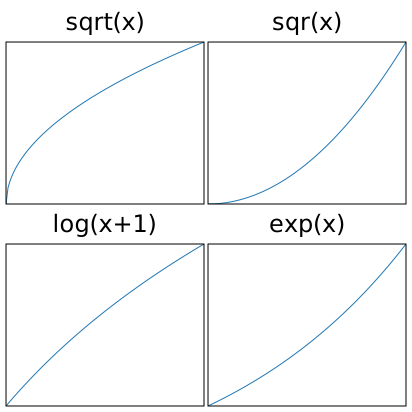
Alternatively, for the sake of compactness, we subplot(pos) where pos is a 3-digit integer. The digits are interpreted as if given separately as three single-digit integers, i.e. fig.add_subplot(235) is the same as fig.add_subplot(2, 3, 5). Note that this can only be used if there are no more than 9 subplots. The same graph above can be then obtained by the following source code:
		svg::plot::SVGPlot plt;
      auto x = svg::plot::linspace(0.0,1.0,100);
      for (int p = 0; p<4;++p) plt.subplot(2,2,p).figsize({200,200}).xticks({}).yticks({});
      plt.subplot(220).title("sqrt(x)").plot(x,sqrtf);
      plt.subplot(221).title("sqr(x)").plot(x,[] (float x) { return x*x; });
      plt.subplot(222).title("log(x+1)").plot(x,[] (float x) { return std::log(x+1); });
      plt.subplot(223).title("exp(x)").plot(x,expf);
		plt.savefig("../doc/svgplot/subplot/example2.svg");
FROM HERE DOWN IT IS NOT IMPLEMENTED YET, BUT WORK IN PROGRESS
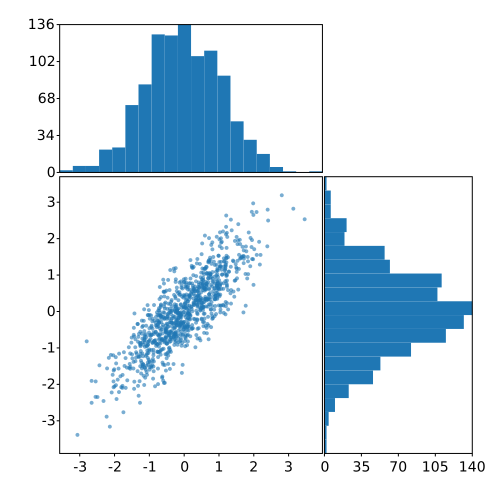
The sizes for each subplot can be irregular, and the subplot positioning will do its best to adapt the positions while preserving the corresponding sizes as described by the figsize named parameter. Also, some subplots might be empty (if you never access to one of the indices then the corresponding space will be empty). This is illustrated here:
std::mt19937 gen{1}; //Fixed seed
std::normal_distribution<float> d{0,1};
std::list<float> x, y;
for (int n=0;n<1000;++n) {
    y.push_back(d(gen)); x.push_back(0.8*y.back() + 0.5*d(gen));
}
svg::plot::SVGPlot plt;
plt.subplot(2,2,2).figsize({300,300}).scatter(x,y).s(2).alpha(0.6);
plt.subplot(2,2,0).figsize({300,150}).xticks({}).hist(x).bins(20).orientation(svg::plot::vertical);
plt.subplot(2,2,3).figsize({150,300}).yticks({}).hist(y).bins(20).orientation(svg::plot::horizontal);
plt.savefig("../doc/svgplot/subplot/example3.svg");
that generates a figure with some subplots of uneven sizes and some empty space:
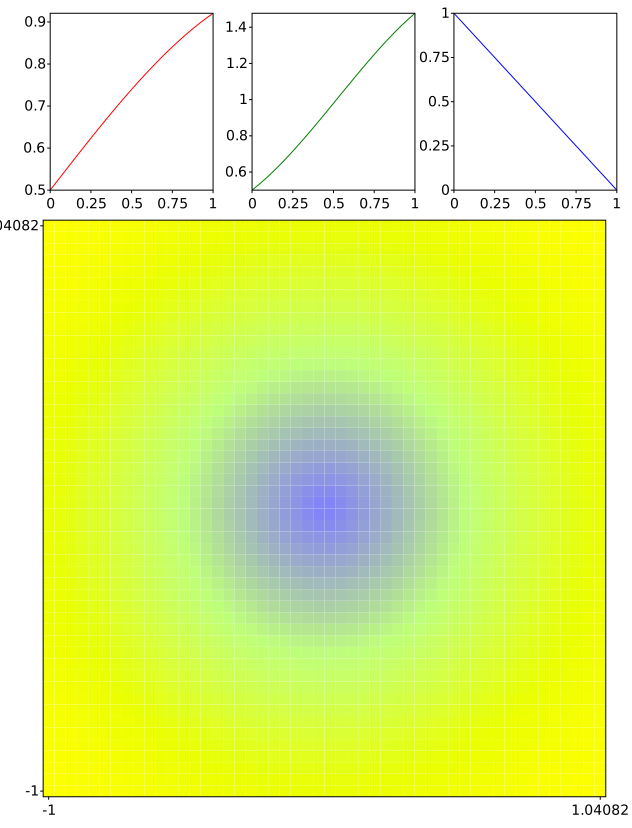
Last, as the subplot method of the svg::plot::SVGPlot class actually returns svg::plot::SVGPlot&, subplots can be constructed recursively to define sophisticated layouts:
auto r = [] (float x) { return 0.5f+0.5f*std::sin(x); };
auto g = [] (float x) { return 0.5f+x*std::sin(x+M_PI/4.0); };
auto b = [] (float x) { return 1.0 - x; };
auto f = [&] (float x, float y) {
    float d = std::sqrt(x*x+y*y);
    return std::tuple(r(d),g(d),b(d));
};
svg::plot::SVGPlot plt;
plt.subplot(2,1,0).subplot(1,3,0).figsize({200,200}).plot(svg::plot::linspace(0,1,25),r).color("red");
plt.subplot(2,1,0).subplot(1,3,1).figsize({200,200}).plot(svg::plot::linspace(0,1,25),g).color("green");
plt.subplot(2,1,0).subplot(1,3,2).figsize({200,200}).plot(svg::plot::linspace(0,1,25),b).color("blue");
plt.subplot(2,1,1).figsize({600,600}).imshow(svg::plot::linspace(-1,1,50),svg::plot::linspace(-1,1,50),f);
plt.savefig("../doc/svgplot/subplot/example4.svg");
that generates the following subplot distribution:
Subplot positioning
The default positioning of the subplots might not meet your needs, but it can be adjusted through the subplots_adjust() method that has the following named parameters (remember that named parameters are expressed as concatenated methods in this library):
left: The position of the left edge of the subplots, as a fraction of the figure width.right: The position of the right edge of the subplots, as a fraction of the figure width.bottom: The position of the bottom edge of the subplots, as a fraction of the figure height.top: The position of the top edge of the subplots, as a fraction of the figure height.hspace: The width of the padding between subplots, as a fraction of the average subplot width.vspace: The height of the padding between subplots, as a fraction of the average subplot height.
As an example, we modify one of the examples above adjusting all the subplot adjustment parameters:
std::mt19937 gen{1}; //Fixed seed
std::normal_distribution<float> d{0,1};
std::list<float> x, y;
for (int n=0;n<1000;++n) {
    y.push_back(d(gen)); x.push_back(0.8*y.back() + 0.5*d(gen));
}
svg::plot::SVGPlot plt;
plt.subplots_adjust().hspace(0).wspace(0).left(0.05).right(0.95).top(0.05).bottom(0.95);
plt.subplot(2,2,2).figsize({300,300}).scatter(x,y).s(2).alpha(0.6);
plt.subplot(2,2,0).figsize({300,150}).xticks({}).hist(x).bins(20).orientation(svg::plot::vertical);
plt.subplot(2,2,3).figsize({150,300}).yticks({}).hist(y).bins(20).orientation(svg::plot::horizontal);
plt.savefig("../doc/svgplot/subplot/example5.svg");
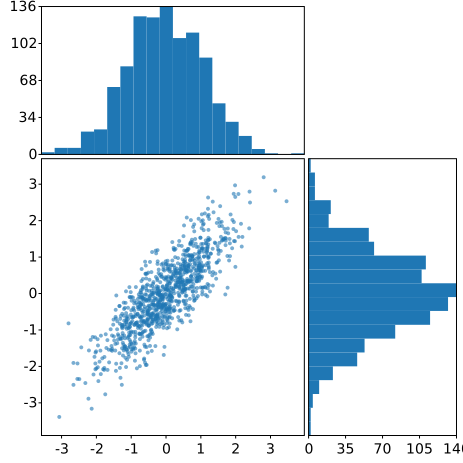
returning a new graph with shorter distance between the plots: