SVGPlot::plot
The plot method provides a versatile and fast way of plotting graphs and curves from the svg::plot::SVGPlot class. Generating visualizations is very quick:
	svg::plot::SVGPlot plt;
	plt.plot({1,2,3,4});
	plt.ylabel("some numbers");
	plt.savefig("../docs/svgplot/plot/example1.svg");
generates the following graph:
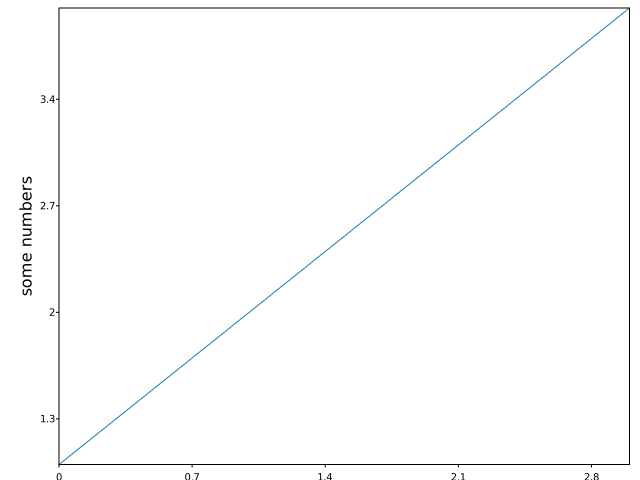
You may be wondering why the x-axis ranges from 0-3 and the y-axis from 1-4. If you provide a single list or array to the plot() method, it is assumed that it represents a sequence of y values, and automatically generates the x values for you, starting from 0 (in this case {0, 1, 2, 3}).
plot() is a versatile method. For example, to plot x versus y, you can do
	svg::plot::SVGPlot plt;
	plt.plot({1, 2, 3, 4}, {1, 4, 9, 16});
	plt.savefig("../docs/svgplot/plot/example2.svg");
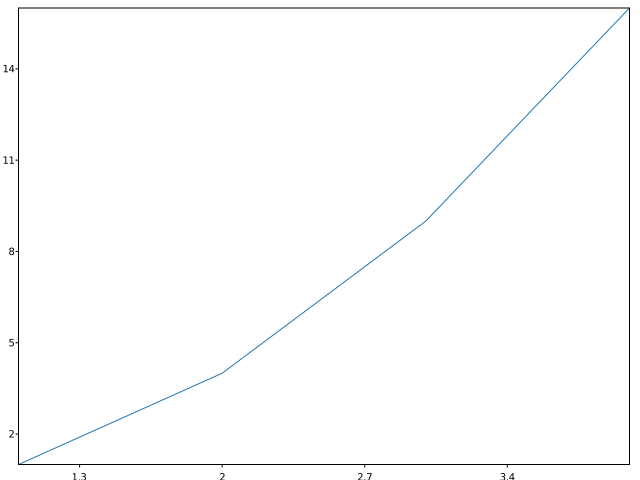
to include also specific values on the x axis and therefore generate
Of course the plot() method is not limited to bracketed lists. It can also work with any STL linear container of floating point numbers (such as std::list<float>). Additionaly, a python-like arange(<start>,<stop>,<step>) is provided as a list generator. These are illustrated in the following code:
	svg::plot::SVGPlot plt;
	float f=-1.0;
	std::list<float> l;
	for (int i=0; i<100;++i) l.push_back(f*=-1.005);
	plt.plot(svg::plot::arange(0,5,0.05),l);
	plt.savefig("../docs/svgplot/plot/example3.svg");
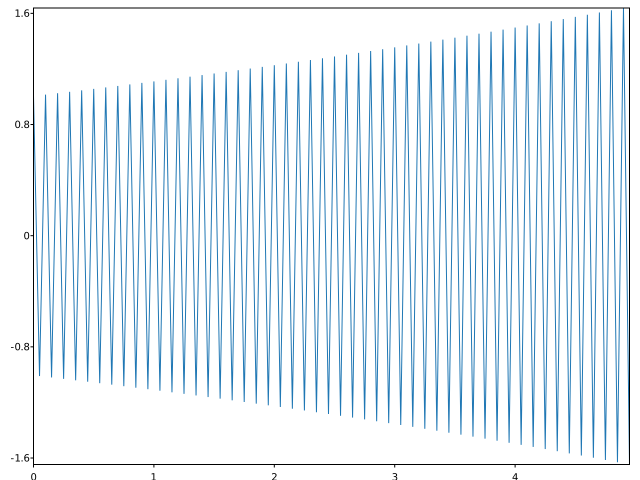
that generates
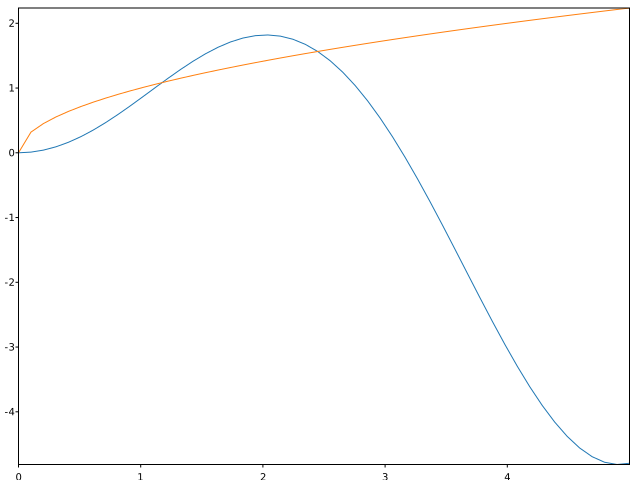
Furthermore, it is also possible to use functions as the y parameter. In that case, the function is evaluated for all the real numbers in x and plotted accordingly, as follows:
	svg::plot::SVGPlot plt;
	auto x = svg::plot::linspace(0,5);
	plt.plot(x,[] (float x) { return x*std::sin(x);});
	plt.plot(x,sqrtf);
	plt.savefig("../docs/svgplot/plot/example4.svg");
The above example also illustrates the provided python-like linspace(<start>,<stop>,<nsamples=50>) list generator. It generates the following graph:
Formatting
There are several named attributes that can be used for formatting the plot. However, as C++ does not specifically support such feature, these named attributes are implemented as postfix methods, appended consecutively at the end of the plot method call.
These are this named attributes:
markersize(<float>)sets the size of the marker.marker(<string>)defines the style of the marker represented as a single charater (the same characters as for scatter plots).markeredgewidth(<float>)sets the width of the line around the markers.linewidth(<float>)sets the width of the line.linestyle(<string>)defines the style of the line (-full line,--dashed line,-.chain line,..small dashed line). Alternatively, it is also possible to pass a list of floats indicating the size of the lines and spaces among them, consecutively.color(<color>)defines the color of the plot.markerfacecolor(<color>)defines the color of the markers.markeredgecolor(<color>)defined the color of the edges of the markes.
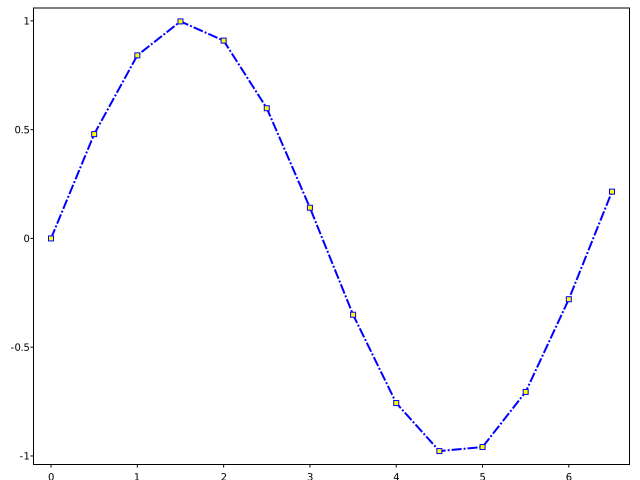
As an usage example for these parameters, we provide this:
	svg::plot::SVGPlot plt;
	plt.plot(svg::plot::arange(0,7,0.5),[] (float x) { return std::sin(x); })
		.linestyle("-.").color(svg::hsv(240,1,1)).linewidth(2)
		.marker("s").markeredgecolor(svg::hsv(240,1,1)).markerfacecolor(svg::yellow).markersize(2.5).markeredgewidth(1);
 	plt.savefig("../docs/svgplot/plot/example5.svg");
which yields the following graph:
Alternatively, it is possible to use format strings, structured as
"[marker][line][color]"
Each of them is optional. If not provided, a default value (alternating so it actually changes from plot to plout) is used. The exceptions are the interactions between lines and markers: If line is given, but no marker, the data will be a line without markers, and if marker is given but no line, the data will be markers without lines.
Other combinations such as [color][marker][line] are also supported, but note that their parsing may be ambiguous.
The fmt can be either a named attribute or also a nameless attribute added at the end of the data, as illustrated in the following example:
	svg::plot::SVGPlot plt;
	plt.plot(svg::plot::arange(0,20,0.05),
		[] (float x) { return x*std::sin(x);}).fmt("g-");
	plt.plot(svg::plot::arange(0,20,0.05),
		[] (float x) { return x*std::sin(x+0.4*M_PI);}).fmt("r--");
	plt.plot(svg::plot::arange(0,20,0.05),
		[] (float x) { return x*std::sin(x+0.8*M_PI);}).fmt("b-.");
	plt.plot(svg::plot::arange(0,20,0.05),
		[] (float x) { return x*std::sin(x+1.2*M_PI);}).fmt("y:");
	plt.plot(svg::plot::arange(0,20,0.05),
		[] (float x) { return x*std::sin(x+1.6*M_PI);}).fmt("k");

	plt.plot(svg::plot::arange(0,20,0.25),
		[] (float x) { return 50+x*std::sin(x);},"go");
	plt.plot(svg::plot::arange(0,20,0.25),
		[] (float x) { return 50+x*std::sin(x+0.4*M_PI);},"r^");
	plt.plot(svg::plot::arange(0,20,0.25),
		[] (float x) { return 50+x*std::sin(x+0.8*M_PI);},"bs");
	plt.plot(svg::plot::arange(0,20,0.25),
		[] (float x) { return 50+x*std::sin(x+1.2*M_PI);},"y+");
	plt.plot(svg::plot::arange(0,20,0.25),
		[] (float x) { return 50+x*std::sin(x+1.6*M_PI);},"k.");

	plt.savefig("../docs/svgplot/plot/example6.svg");
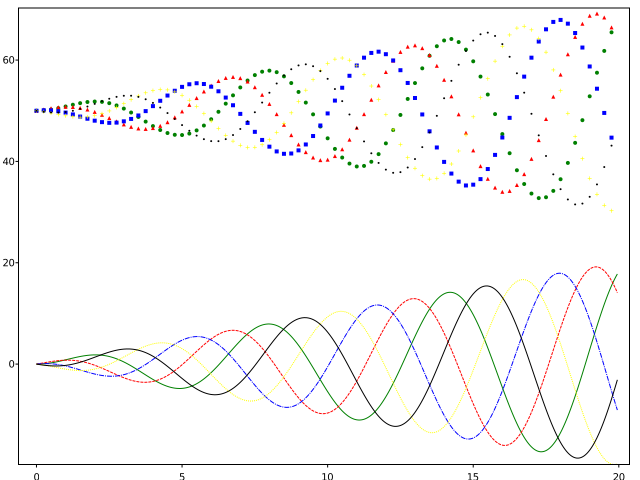
which gives the following output: